TillKit UK Postcode Rules
Control shipping rates and restrictions by UK postcode, even on Shopify Basic
Postcode-level shipping rules: choose which shipping rates shoppers see, or block items you can't deliver to their address. It uses the prices you've already set in Shopify, so you don't need prices fetched from couriers.
FREE for up to 5 rules.


Why one UK shipping zone isn't enough
Shopify lets you set delivery prices by country and region, not by postcode. Northern Ireland has its own region but the Highlands and Islands doesn't, so shoppers there get the mainland prices.
A pallet won't reach the Scottish islands and a bulky item costs more to send to the Isle of Wight.
Choose where a rule applies with a ready-made area or your own postcodes, and which items in the cart it covers. Then show one of the delivery prices you've already set up in Shopify for that area, or block delivery with a message naming the item.
Is it right for your store?
A good fit
- UK stores selling pallets or bulky items that can't go to every postcode
- Stores that charge more for the Highlands and Islands, Northern Ireland or the Isle of Wight
Not a fit
- Delivering abroad. The app works with addresses in the UK, the Isle of Man and the Channel Islands only.
- Live courier quotes. The app works with the prices you set in Shopify and never sets or changes a price.
Why we made it
We built it for our own Shopify store first. Our suppliers won't deliver to some UK postcodes and one charges extra for others. On the Basic plan we use, Shopify's shipping zones work by region rather than postcode, so we needed an app that could do it at checkout. The postcode apps we looked at match postcodes as text, so a rule for PA6 also catches PA60 to PA69, and almost none had the UK's awkward areas ready to pick. So we made one that reads UK postcodes properly, and now any store can use it.
Charge more for the Highlands and Islands, Northern Ireland or the Isle of Wight
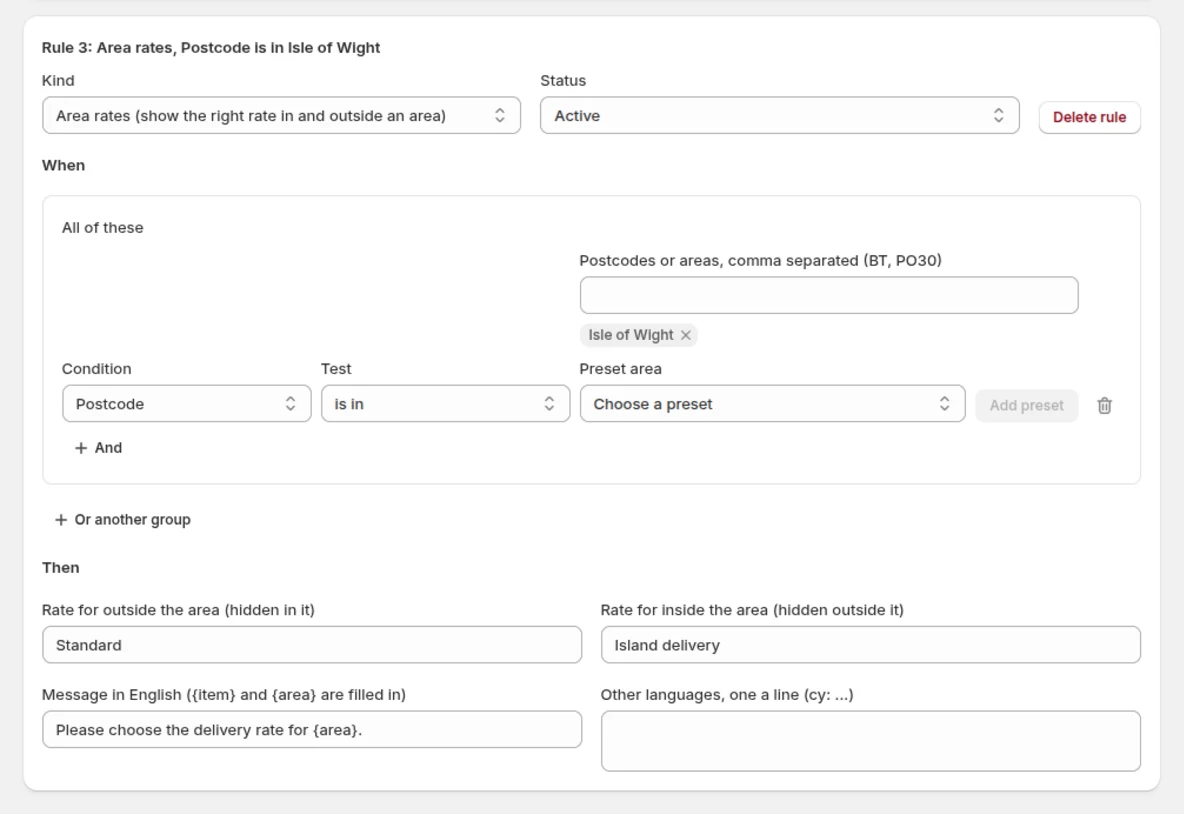
Set separate island and mainland delivery prices in Shopify. Choose the island postcodes in the app to show the island price there and the mainland price everywhere else.
If an island shopper still has mainland delivery selected, checkout stops them paying and shows your message.
Block shipping to certain postcodes, with a message naming the item
Block products you can't deliver to a postcode and tell the shopper which item can't go. Your message appears beside the postcode field or at the top of checkout, and it can name the item and the shopper's area.
Choose when checkout stops the order: as soon as the shopper enters their address, or when they try to pay.
Hide, rename or move delivery rates by postcode
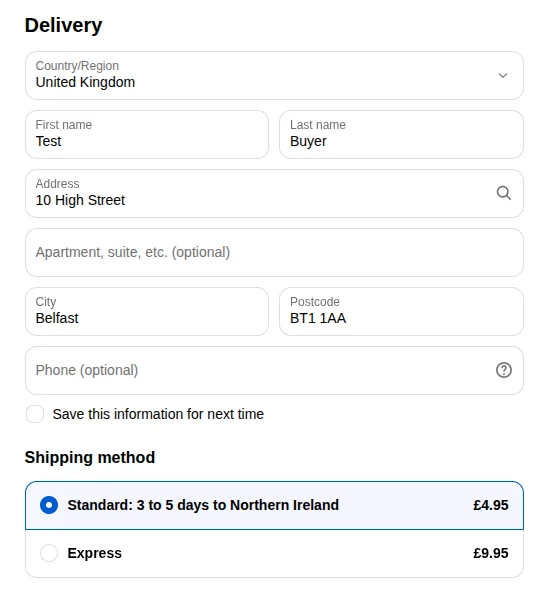
Choose which delivery options shoppers see for their postcode. Hide one that doesn't suit an area, rename one so shoppers know what to expect ("Standard: 3 to 5 days to the island") or move one up the list. You can also show only the options you name.
A rule can't leave a shopper with no way to have their order delivered, and moving a rate never puts a dearer one above the cheapest.
Test a rule on your real checkout before customers see it
Set a rule to Testing and the rules page gives you a link with a Copy link button. Open it and your own cart sees the rule at checkout, on your live store, while your customers carry on as normal. Send the link to a colleague to try it too. Open the link again when you start a new cart.
More ways to set a rule
Choose which orders are affected
Apply a rule by brand or supplier, product tags, the cart total or the number of items.
Cover everywhere outside your delivery area
Apply a rule everywhere outside the postcodes you list. You can also let an order qualify by meeting any one of several checks.
Block addresses your courier can't reach
Block PO boxes and British Forces Post Office (BFPO) addresses when your courier or pallet network can't deliver there.
Block delivery methods you can't offer
Stop shoppers choosing a delivery service you can't offer to their postcode, such as next-day delivery to the Highlands.
Apply rules when you need them
Choose which days and times a rule applies, in your shop's time zone.
Free delivery over a set spend
Hide free delivery in an area until the cart reaches a set total, or show a pallet rate only under it. The total is the items before delivery.
At checkout and on the rules page
Write messages your shoppers can read
Explain delivery restrictions in English, Welsh or any other language your store sells in.
Ask shoppers to check unclear postcodes
If the app can't read a UK postcode and a postcode rule could apply, checkout asks the shopper to check it before paying.
Check a postcode first
Enter a postcode on the rules page to see which rules apply and the exact message a shopper would see.
See switched-off or changed rules
Get a warning if your rules are switched off in Shopify or differ from the version you saved.
Works on Basic, with no carrier-calculated shipping or Advanced plan
UK Postcode Rules works on every Shopify plan, Basic included. It uses the delivery prices you've already set up in Shopify, so you don't need carrier-calculated shipping (prices fetched from couriers) or the Advanced plan.
Ready-made areas, or type your own (BT, PO30, PO30-41)
Add a ready-made area to a rule in one click instead of typing postcodes: Northern Ireland, the Isle of Wight, the Isles of Scilly, the Isle of Man, the Channel Islands or Scotland, as Royal Mail's Highlands and Islands or DPD's Highlands and its islands. Parcelforce's Scottish islands list is there too. For anywhere else, type the first half of the postcode, the part before the space, such as BT or PO30. Separate several with commas.
How to write postcodes
| Type | It matches |
|---|---|
BT | Every postcode starting BT, which is all of Northern Ireland |
PO30 | Every postcode starting PO30. A district also covers its lettered versions, so SW1 covers SW1A |
PO30-41 | Every district from PO30 to PO41, which is the Isle of Wight |
EC1A | Every postcode starting EC1A, and no other part of EC1 |
KW1-14, IV, HS | Several at once, separated by commas |
A rule matches whole districts, so PA6 covers PA6 postcodes and never PA60.
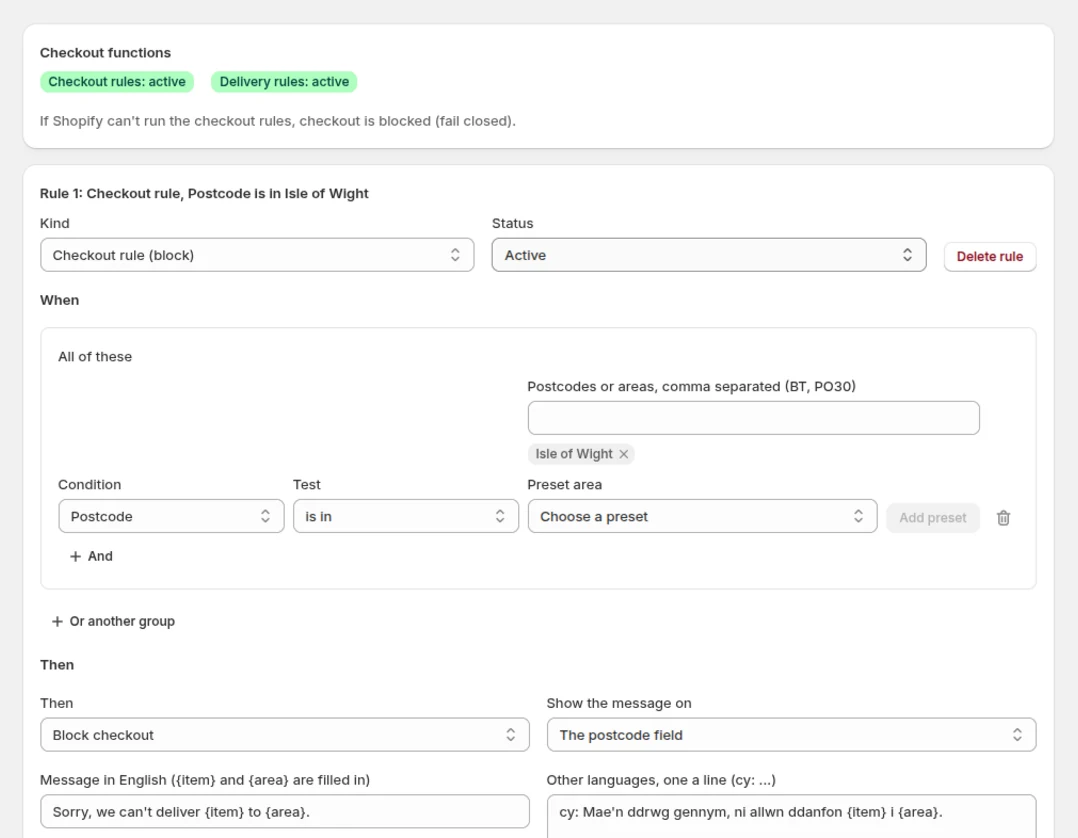
See it in the admin and at checkout
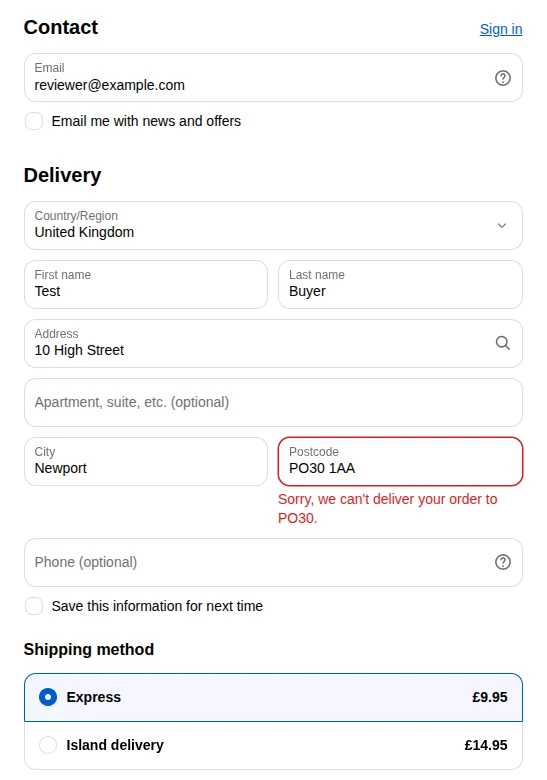
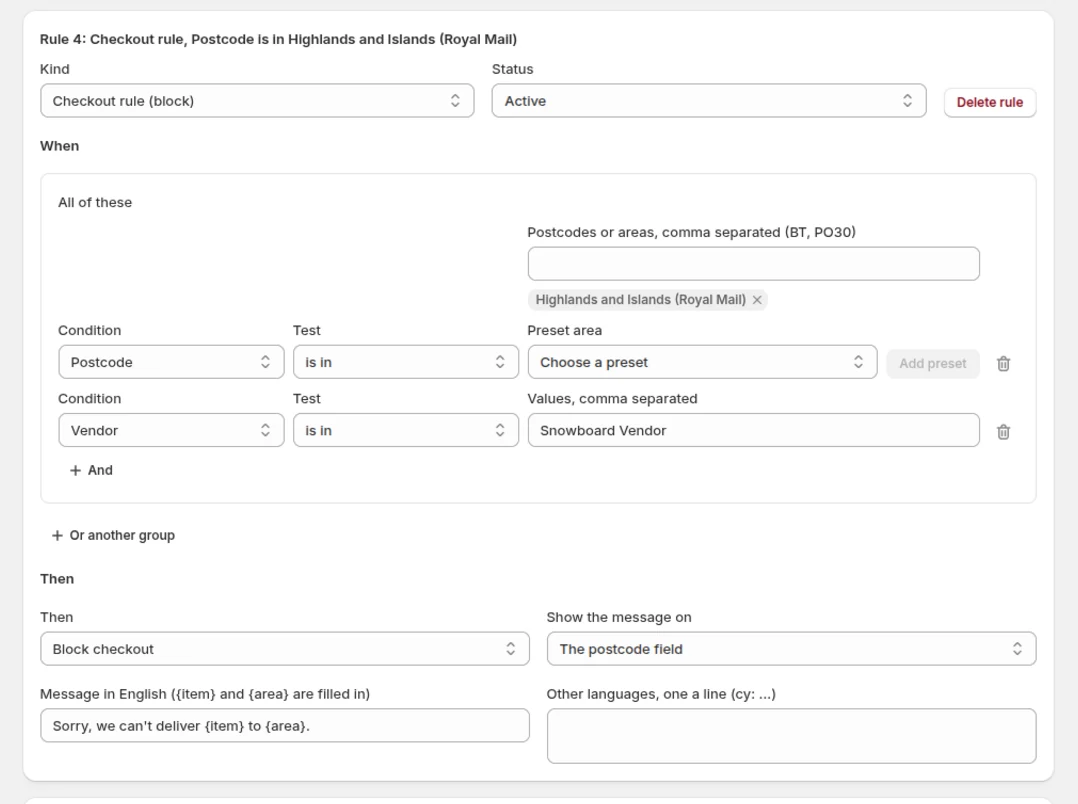
Block a supplier's products in the Highlands
Uses Royal Mail's Highlands and Islands list, with your message on the postcode field.
An island price for the Isle of Wight
Shoppers everywhere else see the mainland price.
A renamed rate at checkout
The shopper sees your new name for a Northern Ireland postcode.
The rules page
Every rule and whether Shopify is running them, inside your Shopify admin.
How it works
-
Install
Install the app from the Shopify App Store. The rules page opens inside your Shopify admin, with no separate login.
-
Add a rule
Choose whether to block items or change the delivery options shoppers see. Then pick a ready-made area or type your own postcodes.
-
Test it
Set the rule to Testing and open its testing link to try it at checkout. It applies only to the cart opened through that link, so your customers don't see it yet.
-
Switch it on
Set it to Active. Your rules are saved in your own store and Shopify runs them at checkout.
Pricing: free for up to 5 rules
Free
Up to 5 rules, including rules you're testing. Switched-off rules don't count, so you can keep others ready to use.
Works on every Shopify plan, Basic included.
Questions
New to the app? The getting started guide walks through each kind of rule.
How do I charge more for shipping to the Scottish Highlands and Islands on Shopify?
Set mainland and Highlands and Islands delivery prices in Shopify. Pick the ready-made Highlands and Islands list to show the dearer price there and the mainland price everywhere else. If a shopper there still has mainland delivery selected, checkout stops them paying. The app never sets a price.
Can I set shipping rates by UK postcode on the Basic plan?
Yes. It works on every Shopify plan, Basic included, with the delivery prices you've already set up in Shopify. You don't need carrier-calculated shipping or the Advanced plan.
How can I block shipping to certain postcodes?
Add a checkout rule with a ready-made area or your own postcodes, such as BT for Northern Ireland or PO30-41 for the Isle of Wight. The shopper sees your message at the postcode field and can't complete checkout.
How do I set different shipping rates for UK mainland and offshore areas?
Set up each delivery price in Shopify, then pick the ready-made lists for the Highlands and Islands, Northern Ireland, the Isle of Wight, the Isles of Scilly, the Isle of Man or the Channel Islands. Each list can show its own price, and the mainland price shows everywhere else.
Can I stop certain products being delivered to some postcodes?
Yes. Pick the products by brand or supplier, or by product tag, and add the cart total or number of items if you need them. The message names the item that can't be delivered.
What does a customer see when their postcode is blocked?
Your own message, beside the postcode field or at the top of checkout. It can fill in the item and the shopper's district, so a shopper in PO30 might see "Sorry, we can't deliver the garden bench to PO30." Write it in English, Welsh or any language your store sells in.
Can I test a rule before customers see it?
Yes. Set it to Testing and open its testing link. It applies only to the cart opened through that link, so open the link again when you start a new cart. You can also enter a postcode on the rules page to see which rules apply.
Does the app keep my customers' addresses?
No. The rules run on Shopify's own servers at checkout and keep nothing, so no orders, addresses or payment details reach us. The app's privacy policy has the detail.
What happens to checkout if the app's servers are down?
Checkout carries on as normal. Your rules are stored in your own store and Shopify runs them, so an outage on our side stops rule changes, not orders.
What happens when I uninstall?
We delete the app's sign-in for your store straight away. Your rules stay in your store and we keep no copy.
Try it on your store
Try a postcode rule on your store before your customers see it. Install the app, add a rule and open its testing link.
FREE for up to 5 rules.